Looking for an MP3 player? Trying to find what you need at the best value? So you looked at user reviews of the MP3 players out there. And you decide you'll go with an apple device. Now what? Apple makes 4 iPod devices. The iPod Classic, iPod Nano, iPod Shuffle, and the iPod Touch.
iPod Classic
The iPod Classic will set you back $249, but gives you 160GB of storage. It does music, videos, and podcasts, along with games. It also includes a clock and some other basic features.
iPod Nano
The Nano costs $149 for 8GB, or you can double the storage for an added $30. It, unlike its predecessor, only does music, podcasts, and radio (a feature not available on any other models). Its small touchscreen display might be a little too small for one's fingers. For video recording and playback, you might want to check out the earlier edition (5th generation), but get it while you can.
iPod Shuffle
The Shuffle is available at an inexpensive $45. For that you get 2GB of storage. The Shuffle was once available in 4GB, but it seems that currently only a 2GB version is available. The Shuffle can only do music and audio podcasts. It has no screen, so you have to organize your music in the right order on iTunes.
iPod Touch
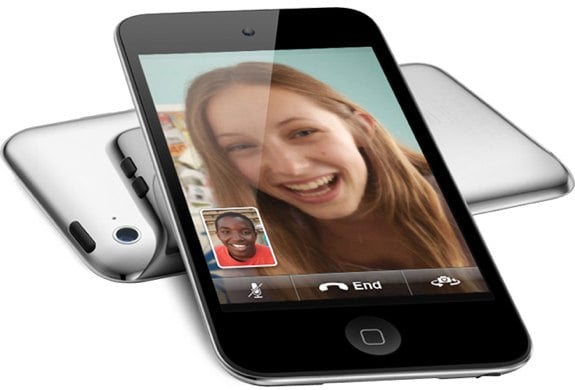
The iPod Touch is my recommendation. It is available in 8GB, 32GB, and 64GB, at prices of $229, $299, and $399, respectively. For only $80 more than the Nano, you get video recording and playback, two cameras, the ability to run apps, a web browser, and more. Pretty much everything you can do on an iPhone 4 you can also do on an iPod Touch. So if all you need is the ability to listen to some music, the Shuffle should be fine. For more features, get either the current Nano, or, I would recommend the previous one. For a lot of storage, and most of what the Nano can do, go with the Classic. But if you want a very useful, fun device that can do almost everything the above devices can do and more, choose the iPod Touch.
Below is a short video advertisement for the Apple iPod.
It has been rumored, and maybe more than rumored, that wireless providers may start charging per service. What this means is that your wireless carrier, such as Verizon, Sprint and AT&T, would, instead of charging a flat fee for a certain amount of data, would charge different amounts of money, see the diagram below for an example.
The above is an actual slide from a marketing webinar by two companies, Allot and Openet, who consider AT&T, Verizon, and Vodafone as their clients. So is this what we want? Is this what you want? Is this what the world wants? Or is this just what the carriers want? From this, it's hard to tell what the costs for plain internet browsing will be, or what it will cost to run any other apps. It's hard to understand what this is telling us, but we know it's telling us something, and has the ability to change our lives.
It's time we stop having to go to the store to buy that new computer game. It's time we stop trying to remember where we put that disk. It's time we do something different with our gaming. OnLive is an attempt at just that.
OnLive is an online gaming system which streams games right to your Mac or PC. You can play when you want, without having to remember where you put that disk.
It's a free service, and you only pay for the games. There are a few ways to purchase the games. You can buy a 3 day pass, a 5 day pass, or full access to the game anytime, although not all games are available with all three forms of purchase. Prices range from $6 to $50,depending on which game you want and for how long. Besides just playing games, With OnLive you can watch others play games in real-time, play trial versions of games, and more.
OnLive on iPad
One may run into a few issues when trying OnLive. Firstly, internet connection speed is a very important factor, and without a sufficient speed, OnLive won't even start. Another issue is th range of titles. When looking through the game library, there were only a few titles that I recognized. These include Assassin's Creed II, Major League Baseball 2K10, and Far Cry 2. Although I am not an avid gamer, the selection did not seem very wide. Also, besides for playing on th PC or Mac, OnLive has an iPad app, and now, a new TV connected gaming system. This system, which comes with the actual device and a XBOX-like controller, is available for $99. The actual device, since everything it does is through the internet, is about the size of an average smart phone. It does what the OnLive for Mac and PC does, but on your TV.
The OnLive System for TVs
So is OnLive better than buying an XBOX 360 or PS3? You'll have to decide for yourself. Look at the game library, and do some more research on the service. If you have a blazing fast internet connection (Ethernet, not WiFi), then maybe this might be good for you. If your internet connection takes a while to load the following video, then it's probably not a good choice.
If you're looking for a capable and versatile smartphone, then you absolutely must consider the Captivate. I think most of the other reviewers have covered the basics of how the Captivate compares to the iPhone (and beats it), so let me mention a few features that you might not know about.
The phone supports syncing with Exchange out of the box. Not only does it sync e-mail, but it also handles contacts and calendar. I use it for my work e-mail, and it performs flawlessly. Needless to say, you can also connect via POP3 and IMAP.
VPN access is also available for those who need to connect to their corporate networks.
The basic browser is quite capable, but if you want something else, then you can choose Dolphin Browser, Opera Mini, or Skyfire, to name a few.
Although MS Office documents and PDF's aren't supported out of the box, Quickoffice for Captivate and Adobe Reader are free downloads.
Google Navigate offers free voice-guided, turn-by-turn GPS navigation. No need to pay AT&T for their service.
Wi-fi access is silky smooth. To enable it, pull down the notification drawer at the top of the screen and touch the wi-fi button. Wi-fi will turn on, and if you have never connected to an available network, a list of what's available will appear. Choose the network you want, enter any required login information, and click Connect. That's it, and, from then on, the phone will automatically connect to that network if it's available.
I want to mention a little-known app called Google Shopper. Install it, and you'll be able to shop for books and CD's by simply starting the app and pointing the camera at them. The app scans the cover or barcode and shows you prices from online and local merchants. Much faster than having to manually look up titles while you're standing in a bookstore aisle. College students wondering how badly the campus bookstore is ripping them off on textbooks compared to other sellers will appreciate this app.
And I can't forget to mention the Captivate's voice recognition capabilities. You can search by voice, and, if you switch the default keyboard from Swype to standard Android, you can use voice dictation for almost anything that you can type. And while it does make mistakes, they don't happen often.
Google Voice is available for the Captivate, something Apple will probably never allow on the iPhone. Need separate phone numbers for work and personal use? Then Google Voice is what you're looking for.
And finally, if you need or want Push-to-Talk similar to the service that Nextel offers, well, there are several free apps for that. They will only connect you to other Android users running the same app, but, for a business needing to have this functionality and interested in getting several Android phones, then such a solution is worth looking at. The apps are still a little rough around the edges, but give them a little time to mature.
My point here is that, although this is one beautiful phone, it's also extremely good at handling business tasks. Yes, it handles Facebook, MySpace, and Twitter beautifully, but it will also keep you in touch with colleagues and clients as well, if not better than, any other smartphone out there. ( M. Stevens,Tuscaloosa, AL)
This model of knife was originally designed to be an ASEK (Aircrew Survival Egress Knife) and came with a cord cutter hook. The Infrantry Knife aspect came about after it was given to US troops in Afghanistan and Iraq as a demo item. It is a rugged knife, and has a window punch on its butt and a full tang blade completely insulated by the grip. This aspect came in handy to a certain sniper team in Iraq who cut a power line to a 250 KW Generator in order to dim the lights illuminating their position among around 100 insurgents. The electric arc put an eighth of an inch gash in the knife's blade, but the operator remained unshocked and was able to survive the incident. I am using it currently in Iraq, and I have found that though it isn't the sexiest of edged weapons, it is by far one of the most unyielding. Built in sharpener in sheath is nice, if you know exactly how to use it, otherwise you will nick the blade up a little. Came originally in desert tan/coyote brown, now out in straight black so I will have to by another one for my darker endeavors.




 . I think most of the other reviewers have covered the basics of how the
  (and beats it), so let me mention a few features that you might not know about.
  navigation. No need to pay
  for their service.
  users running the same app, but, for a business needing to have this functionality and interested in getting several Android phones, then such a solution is worth looking at. The apps are still a little rough around the edges, but give them a little time to mature.


